Add Leaderboard
Now, we are going to make a simple leaderboard.
At the end you're going to have project like this folder .You can download it from here.
Learn some functions
First we have to remember that everything for leaderbords is in LoudWolf.Scores and that every function have an async variation called func_name_async
Then let's go right into it.
We have save_score(player_name:String,score:float)
It saves score for player(with name:player_name), but you have to use await.
If you don't want awaiting use save_score_async(player_name,score)
We also have get_scores(x?:int)
It get first x highest scores.
the default x is 10, also if you set x to 0 you get all scores.
Prefer using get_all_scores() if you want to get all scores, but that function don't have async variant
Create ScoreItem scene
The root node is HBoxContainer.Then you add 3 Labels.
They are named: Order, Name and Score.
On the root node add a script named score_item.The scene tree have to look like this:

In the script write(don't paste):
extends Control
class_name ScoreItem # Not nessecary


@export var order_idx:int:
	set(e):
		order_idx=e
		$Order.text=str(e)+"."

@export var player_name:String:
	set(e):
		player_name=e
		$Name.text=e

@export var score:float:
	set(e):
		score=e
		$Score.text=str(e)
The script @exports:
order_idx - first second...100th
player_name - Angelator312, NightGlider ...
score - 10.0, 20.0, 30.0 ...
When you change the exported variables, you also change the text of the Labels.
Create Leaderboard scene
The root is Control with an full rect anchor.
Then add a MarginContainer with name M.Set theme_override_constants/margin_left to 100.
Then add a VBoxContainer with name V(it's children of M).
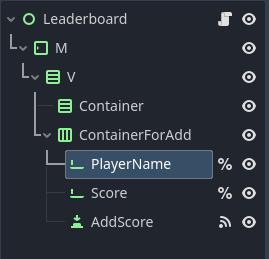
Also add VBoxContainer Container and HBoxContainer ContainerForAdd as childs of V.
Add 2 LineEdits with names PlayerName and Score, also add a Button with name AddScore to ContainerForAdd.
Make the LineEdits have unique name.
I know, that is complicated so let see an image of the sccene tree:
Add a script to the root leaderboard.gd.
- Code
- Explanation
extends Control
class_name LeaderboardScript


const SCORE_ITEM = preload("score_item.tscn")
@onready var container: VBoxContainer = $M/V/Container
@onready var player_name: LineEdit = %PlayerName
@onready var score: LineEdit = %Score


func _ready() -> void:
	LoudWolf.configure_api_key("CsCNpHfeeI4Tvt3u8y8Du6z1PzrWwkak6Y6YyWxY")
	LoudWolf.configure_game_id("examplegame1")
	make_scores()


func make_scores():
    await LoudWolf.Scores.get_all_scores()
	var i:=0
	for sc in LoudWolf.Scores.scores:
		add_item(sc,i)
		i+=1


func add_item(sc,i:int):
	var e:=SCORE_ITEM.instantiate()
	e.order_idx=i+1
	e.player_name=sc.player_name
	e.score=sc.score
	container.add_child(e)


func delete_scores():
	for e in container.get_children():
		e.queue_free()


func _on_add_score_pressed() -> void:
	await LoudWolf.Scores.save_score(player_name.text,score.text)
	delete_scores()
	make_scores()
extends Control
class_name LeaderboardScript

# Some decalrations
const SCORE_ITEM = preload("score_item.tscn")
@onready var container: VBoxContainer = $M/V/Container
@onready var player_name: LineEdit = %PlayerName
@onready var score: LineEdit = %Score


func _ready() -> void:
	# Configure
        LoudWolf.configure_api_key("CsCNpHfeeI4Tvt3u8y8Du6z1PzrWwkak6Y6YyWxY")
	LoudWolf.configure_game_id("examplegame1")
	make_scores() # Draw the leaderboard


func make_scores():
	await LoudWolf.Scores.get_scores(0) # Awaits all scores
        # Add items:
	var i:=0
	for sc in LoudWolf.Scores.scores:
		add_item(sc,i)
		i+=1


func add_item(sc,i:int):
	var e:=SCORE_ITEM.instantiate()
        # Sets the exported variables of the score_item
	e.order_idx=i+1
	e.player_name=sc.player_name
	e.score=sc.score
	container.add_child(e) # Add the score item to the container


## Deletes all scores
func delete_scores():
	for e in container.get_children():
		e.queue_free()


func _on_add_score_pressed() -> void:
        # Save score and awaits for the saving
	await LoudWolf.Scores.save_score(player_name.text,score.text)
        # Reloads the leaderboard
	delete_scores()
	make_scores()
If you can't understand what the script makes open the explanation tab, but please first think yourself.
Ooh, I forget to say that you have to connect AddScore's _on_pressed() to the root script.